Subtotal $0.00


Day 1
● History of Java
● What is Java?
● Java Example
● Types of Java Applications
○ Standalone Application
○ Web Application
○ Enterprise Application
○ Mobile Application
● Java Platforms / Editions
○ Java SE (Java Standard Edition)
○ Java EE (Java Enterprise Edition)
○ Java ME (Java Micro Edition)
○ JavaFX
Tools Required
1. Development tool –
a. Eclipse / STS / Intellij Idea
b. JDK – Version 8
Intellij Link – https://www.jetbrains.com/idea/download/#section=windows
JDK link – https://www.oracle.com/in/java/technologies/javase/javase8-archive-downloads.html
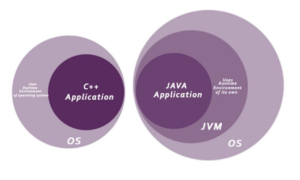
What happens at compile time?
At compile time, the Java file is compiled by Java Compiler (It does not interact with
OS) and converts the Java code into bytecode
What happens at runtime?
At runtime, the following steps are performed:
Classloader: It is the subsystem of JVM that is used to load class files.
Bytecode Verifier: Checks the code fragments for illegal code that can
violate access rights to objects.
Interpreter: Read bytecode stream then execute the instructions.
Unicode System
Unicode is a universal international standard character encoding that is capable of representing most of the world’s written languages.
Why java uses Unicode System?
Before Unicode, there were many language standards:
● ASCII (American Standard Code for Information Interchange) for the United States.
● ISO 8859-1 for Western European Language.
● KOI-8 for Russian.
● GB18030 and BIG-5 for chinese, and so on.
Problem
This caused two problems:
1. A particular code value corresponds to different letters in the various language standards.
2. The encodings for languages with large character sets have variable length.Some common characters are encoded as single bytes, other require two or more byte.
Solution
To solve these problems, a new language standard was developed i.e. Unicode System.
In unicode, character holds 2 byte, so java also uses 2 byte for characters.
lowest value:\u0000
highest value:\uFFFF
Java Comments
Why do we use comments in a code?
● Comments are used to make the program more readable by adding the details of the code.
● It makes easy to maintain the code and to find the errors easily.
● The comments can be used to provide information or explanation about the variables,
method, class, or any statement.
● It can also be used to prevent the execution of program code while testing the alternative
code.
Types of Java Comments
There are three types of comments in Java.
1. Single Line Comment
2. Multi Line Comment
3. Documentation Comment
Features of Java
1. Simple
2. Object-oriented
3. Platform Independent
4. Secured
5. Robust
6. Architecture-neutral
7. Portable
8. High-performance
9. Distributed
10. Multi-threaded
11. Dynamic
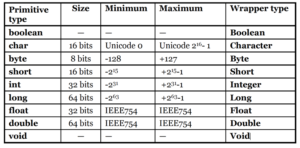
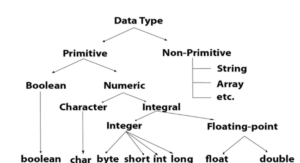
Data Types in Java
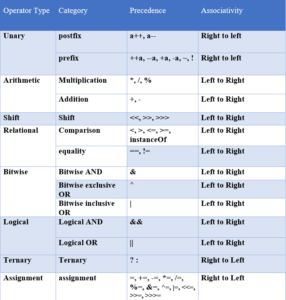
Operators in Java
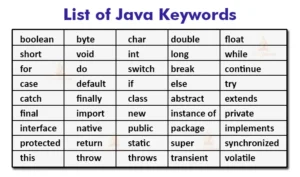
List of Reversed java Keywords :
Java control statements
Java provides three types of control flow statements.
1. Decision Making statements
○ if statements
○ switch statement
2. Loop statements
○ for loop
○ for-each loop
○ do while loop
○ while loop
3. Jump statements
○ break statement
○ continue statement
1) If Statement:
In Java, the “if” statement is used to evaluate a condition. The control of the program is diverted depending upon the
specific condition. The condition of the If statement gives a Boolean value, either true or false. In Java, there are four
types of if-statements given below.
1. Simple if statement
2. if-else statement
3. if-else-if ladder
4. Nested if-statement
Let’s understand the if-statements one by one..
Syntax of if statement is given below.
1. if(condition) {
2. statement 1; //executes when condition is true
3. }
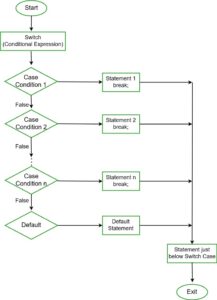
2) Switch Statement
Switch is similar to if-else-if statements. The switch statement contains multiple blocks of code called cases
and a single case is executed based on the variable which is being switched.
The switch statement is easier to use instead of if-else-if statements. It also enhances the readability of the
program.
Points to be noted about switch statement:
● The case variables can be int, short, byte, char, or enumeration. String type is also supported since
version 7 of Java
● Cases cannot be duplicate
● Default statement is executed when any of the case doesn’t match the value of expression. It is
optional.
● Break statement terminates the switch block when the condition is satisfied.
It is optional, if not used, next case is executed.
● While using switch statements, we must notice that the case expression will be of the same type as the
variable. However, it will also be a constant value.
3) while loop
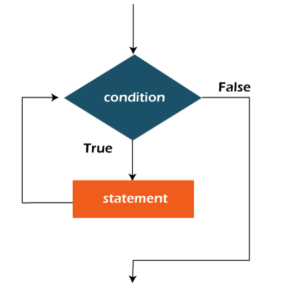
The while loop is also used to iterate over the number of statements multiple times.
If we don’t know the number of iterations in advance, it is recommended to use a while loop.
It is also known as the entry-controlled loop since the condition is checked at the start of the
loop.
If the condition is true, then the loop body will be executed; otherwise, the statements after
the loop will be executed.
The syntax of the while loop is given below.
while(condition){
//looping statements
update_expression;
}
eg.
1) Hello world
2) Display no 1 – 5
3) Print even numbers
4) Sum of Even numbers / odd numbers
4) do-while loop
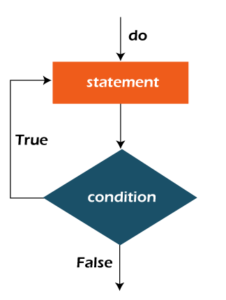
Do while checks the condition at the end of the loop after executing the loop statements.
When the number of iteration is not known and we have to execute the loop at least once, we can
use do-while loop.
It is also known as the exit-controlled loop since the condition is not checked in advance. The
syntax of the do-while loop is given below.
1. do
2. {
3. //statements
4. } while (condition);
Break
Break Statement is used to break the current flow of the program and transfer the control to
the next statement outside a loop or switch statement. However, it breaks only the inner loop
in the case of the nested loop.
The break statement cannot be used independently in the Java program, i.e., it can only be
written inside the loop or switch statement.
Continue
Unlike break statement, the continue statement doesn’t break the loop, whereas, it skips the
specific part of the loop and jumps to the next iteration of the loop immediately.
5) For loop
1. Initialization: It is the initial condition which is executed once when the loop starts. Here, we can
initialize the variable, or we can use an already initialized variable. It is an optional condition.
2. Condition: It is the second condition which is executed each time to test the condition of the loop.
It continues execution until the condition is false. It must return boolean value either true or false.
It is an optional condition.
3. Increment/Decrement: It increments or decrements the variable value. It is an optional condition.
4. Statement: The statement of the loop is executed each time until the second condition is false.
for(initialization; condition; increment/decrement){
//statement or code to be executed
}
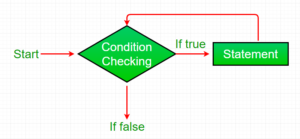
For loop examples
1. Print table
2. Print sum of even/odd number
3. Print Pyramid
Prime number
Prime number is a number that is greater than 1 and divided by 1 or itself only.
In other words, prime numbers can’t be divided by other numbers than itself or 1.
For example 2, 3, 5, 7, 11, 13, 17…. are the prime numbers.
fibonacci series
In fibonacci series, next number is the sum of previous two numbers
for example 0, 1, 1, 2, 3, 5, 8, 13, 21, 34, 55 etc.
The first two numbers of fibonacci series are 0 and 1.
Factorial Program
Factorial of n is the product of all positive descending integers. Factorial of n is denoted by n!. For example:
1. 4! = 4*3*2*1 = 24
2. 5! = 5*4*3*2*1 = 120
Palindrome number
Algorithm
● Get the number to check for palindrome
● Hold the number in temporary variable
● Reverse the number
● Compare the temporary number with reversed number
● If both numbers are same, print “palindrome number”
● Else print “not palindrome number”
Eg. 575, 939
Java Naming Convention
Java naming convention is a rule to follow as you decide what to name your identifiers such as
class, package, variable, constant, method, etc.
But, it is not forced to follow. So, it is known as convention not rule.
These conventions are suggested by several Java communities such as Sun Microsystems and
Netscape.
Advantage
It make your code easier to read for yourself and other programmers.
Readability of Java program is very important. It indicates that less time is spent to figure out what the
code does.
Java Package
A java package is a group of similar types of classes, interfaces and sub-packages.
Package in java can be categorized in two form, built-in package and user-defined package.
There are many built-in packages such as java, lang, awt, javax, swing, net, io, util, sql etc.
Advantage of Java Package
1) Java package is used to categorize the classes and interfaces so that they can be easily maintained.
2) Java package provides access protection.
3) Java package removes naming collision.
Access Modifiers
The access modifiers in Java specifies the accessibility or scope of a field, method, constructor, or class.
1. Private: The access level of a private modifier is only within the class.
It cannot be accessed from outside the class.
2. Default: The access level of a default modifier is only within the package.
It cannot be accessed from outside the package. If you do not specify any access level, it will be the
default.
3. Protected: The access level of a protected modifier is within the package and outside the package through
child class.
If you do not make the child class, it cannot be accessed from outside the package.
4. Public: The access level of a public modifier is everywhere.
It can be accessed from within the class, outside the class, within the package and outside the package.
Java OOPs Concepts
Object-oriented programming is a programming paradigm based on the concept
of “objects”, which can contain data and code:
data in the form of fields, and code, in the form of procedures.
Simula is considered the first object-oriented programming language.
Smalltalk is considered the first truly object-oriented programming language.
The popular object-oriented languages are Java, C#, PHP, Python, C++, etc.
The main aim of object-oriented programming is to implement real-world entities,
for example, object, classes, abstraction, inheritance, polymorphism, etc
Object-Oriented Programming System
Object means a real-world entity such as a pen, chair, table, computer, watch, etc.
Object-Oriented Programming is a methodology or paradigm to design a program
using classes and objects.
It simplifies software development and maintenance by providing some concepts.
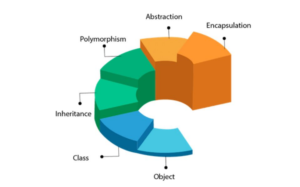
Objects
Any entity that has state and behavior is known as an object.
For example, a chair, pen, table, keyboard, bike, etc. It can be physical or logical.
An Object can be defined as an instance of a class.
An object contains an address and takes up some space in memory.
Objects can communicate without knowing the details of each other’s data or code.
The only necessary thing is the type of message accepted and the type of response
returned by the objects.
Example: A dog is an object because it has states like color, name, breed, etc. as well as
behaviors like wagging the tail, barking, eating, etc.
Class
Collection of objects is called class. It is a logical entity.
A class can also be defined as a blueprint from which you can create an individual
object. Class doesn’t consume any space.
Inheritance
When one object acquires all the properties and behaviors of a parent object, it is
known as inheritance.
It provides code reusability.
It is used to achieve runtime polymorphism.
Polymorphism
If one task is performed in different ways, it is known as polymorphism.
For example: to convince the customer differently, to draw something, for example, shape, triangle,
rectangle, etc.
In Java, we use method overloading and method overriding to achieve polymorphism.
Another example can be to speak something; for example, a cat speaks meow, dog barks woof, etc
Abstraction
Hiding internal details and showing functionality is known as abstraction.
For example phone call, we don’t know the internal processing.
In Java, we use abstract class and interface to achieve abstraction.
Encapsulation:
Binding (or wrapping) code and data together into a single unit are known
as encapsulation.
For example, a capsule, it is wrapped with different medicines.
A java class is the example of encapsulation.
Java bean is the fully encapsulated class because all the data members
are private here
Objects
An entity that has state and behavior is known as an object
e.g., chair, bike, marker, pen, table, car, etc.
It can be physical or logical (tangible and intangible).
The example of an intangible object is the banking system.
An object has three characteristics:
● State: represents the data (value) of an object.
● Behavior: represents the behavior (functionality) of an object such as deposit, withdraw, etc.
● Identity: An object identity is typically implemented via a unique ID
For Example, Pen is an object. Its name is Reynolds; color is white, known as its state.
It is used to write, so writing is its behavior.
An object is an instance of a class. A class is a template or blueprint from which objects are created.
So, an object is the instance(result) of a class.
Object Definitions:
● An object is a real-world entity.
● An object is a runtime entity.
● The object is an entity which has state and behavior.
● The object is an instance of a class.
Class in Java
A class is a group of objects which have common properties.
It is a template or blueprint from which objects are created.
It is a logical entity. It can’t be physical.
A class in Java can contain:
● Fields
● Methods
● Constructors
● Blocks
● Nested class and interface
Instance variable in Java
A variable which is created inside the class but outside the method is known as an instance variable.
Instance variable doesn’t get memory at compile time.
It gets memory at runtime when an object or instance is created. That is why it is known as an instance variable.
Method in Java
In Java, a method is like a function which is used to expose the behavior of an object.
Advantage of Method
● Code Reusability
● Code Optimization
new keyword in Java
The new keyword is used to allocate memory at runtime.
All objects get memory in Heap memory area.
Polymorphism
If one task is performed in different ways, it is known as polymorphism.
1) Method Overloading
A class has multiple methods having same name but different in parameters, it is known as Method Overloading.
Advantage
● Method overloading increases the readability of the program.
Example – Addition of numbers
2) Method Overriding
If subclass (child class) has the same method as declared in the parent class, it is known as method overriding in Java.
Usage:
● Method overriding is used to provide the specific implementation of a method which is already provided by its superclass.
● Method overriding is used for runtime polymorphism
Rules:
● The method must have the same name as in the parent class
● The method must have the same parameter as in the parent class.
● There must be an IS-A relationship (inheritance).
Example
● Vehicle example
● Bank Example
Inheritance
Inheritance in Java is a mechanism in which one object acquires all the properties and behaviors of a parent object.
It is an important part of OOPs (Object Oriented programming system).
The idea behind inheritance in Java is that you can create new classes that are built upon existing classes.
When you inherit from an existing class, you can reuse methods and fields of the parent class.
Moreover, you can add new methods and fields in your current class also.
Inheritance represents the IS-A relationship which is also known as a parent-child relationship.
Why use inheritance
● For Method Overriding
● For Code reusability
Different terms used in Inheritance
● Class: A class is a group of objects which have common properties. It is a template or blueprint from which objects
are created.
● Sub Class/Child Class: Subclass is a class which inherits the other class. It is also called a derived class, extended
class, or child class.
● Super Class/Parent Class: Superclass is the class from where a subclass inherits the features. It is also called a
base class or a parent class.
● Reusability: As the name specifies, reusability is a mechanism which facilitates you to reuse the fields and methods
of the existing class when you create a new class. You can use the same fields and methods already defined in the
previous class.
Syntax
class Subclass-name extends Superclass-name
{
//methods and fields
}
The extends keyword indicates that you are making a new class that derives from an existing class.
The meaning of “extends” is to increase the functionality.
A class which is inherited is called a parent or superclass, and the new class is called child or subclass.
Abstraction
Abstraction is a process of hiding the implementation details and showing only functionality to the user.
It shows only essential things to the user and hides the internal details,
for example, sending SMS where you type the text and send the message. You don’t know the internal processing about the
message delivery.
Abstraction lets you focus on what the object does instead of how it does it.
Ways to achieve Abstraction
There are two ways to achieve abstraction in java
1. Abstract class (0 to 100%)
2. Interface (100%)
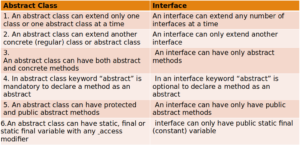
Abstract class
A class which is declared as abstract is known as an abstract class.
It can have abstract and non-abstract methods.
It needs to be extended and its method implemented. It cannot be instantiated.
Points to Remember
● An abstract class must be declared with an abstract keyword.
● It can have abstract and non-abstract methods.
● It cannot be instantiated.
● It can have constructors and static methods also.
● It can have final methods which will force the subclass not to change the body of the method.
abstract class ClassName{}
abstract void methodName();//no method body and abstract
Interface
An interface in Java is a blueprint of a class.
It has static constants and abstract methods.
The interface in Java is a mechanism to achieve abstraction.
There can be only abstract methods in the Java interface, not method body.
It is used to achieve abstraction and multiple inheritance in java.
Java Interface also represents the IS-A relationship.
Since Java 8, we can have default and static methods in an interface.
Why use Java interface?
There are mainly three reasons to use interface. They are given below.
● It is used to achieve abstraction.
● By interface, we can support the functionality of multiple inheritance.
● It can be used to achieve loose coupling.
interface {
// declare constant fields //
declare methods that abstract //
by default.
}
Encapsulation
Encapsulation in Java is a process of wrapping code and data together into a single unit, for example, a capsule which is mixed of
several medicines.
We can create a fully encapsulated class in Java by making all the data members of the class private. Now we can use setter and
getter methods to set and get the data in it.
The Java Bean class is the example of a fully encapsulated class.
Advantages:
By providing only a setter or getter method, you can make the class read-only or write-only. In other words, you can skip the getter or
setter methods.
It provides you the control over the data. Suppose you want to set the value of id which should be greater than 100 only, you can write
the logic inside the setter method. You can write the logic not to store the negative numbers in the setter methods.
It is a way to achieve data hiding in Java because other class will not be able to access the data through the private data members.
The encapsulate class is easy to test. So, it is better for unit testing.
The standard IDE’s are providing the facility to generate the getters and setters. So, it is easy and fast to create an encapsulated class
in Java.
Java Arrays
Normally, an array is a collection of similar type of elements which has contiguous memory
location.
Java array is an object which contains elements of a similar data type. Additionally, The elements
of an array are stored in a contiguous memory location. It is a data structure where we store
similar elements. We can store only a fixed set of elements in a Java array.
Array in Java is index-based, the first element of the array is stored at the 0th index, 2nd element is
stored on 1st index and so on.
array is an object of a dynamically generated class.
Java array inherits the Object class, and implements the Serializable as well as Cloneable
interfaces.
We can store primitive values or objects in an array in Java. Like C/C++, we can also create single
dimensional or multidimensional arrays in Java.
Advantages :
● Code Optimization: It makes the code optimized, we can retrieve or sort the data
efficiently.
● Random access: We can get any data located at an index position.
Disadvantages
● Size Limit: We can store only the fixed size of elements in the array.
● It doesn’t grow its size at runtime.
● To solve this problem, collection framework is used in Java which grows
automatically.
Types of Array in java
There are two types of array.
● Single Dimensional Array
● Multidimensional Array
Single Dimensional Array in Java
Syntax to Declare an Array in Java
1. dataType[] arr;
2. dataType []arr;
3. dataType arr[];
Instantiation of an Array in Java
1. arrayRefVar=new datatype[size];
String in Java
The CharSequence interface is used to represent the sequence of characters.
String, StringBuffer and StringBuilder classes implement it.
It means, we can create strings in Java by using these three classes.
1. String
2. StringBuffer
3. StringBuilder
String in Java
String is basically an object that represents sequence of char values.
An array of characters works same as Java string.
For example:
char[] ch={‘t’,’a’,’l’,’e’,’n’,’t’,’p’,’r’,’o’,’t’,’e’,’c’,’h’};
String s=new String(ch);
String s = “talentprotech”;
String class provides a lot of methods to perform operations on strings such as compare(),
concat(),
equals(), split(), length(), replace(), compareTo(), intern(), substring() etc.
How to create a string object?
There are two ways to create String object:
1. By string literal
2. By new keyword
1) String Literal
Java String literal is created by using double quotes.
E.g. String s=”Welcome to Java”;
String objects are stored in a special memory area known as the “string constant pool”.
2) By new keyword
E.g String s=new String(“Welcome to java”);//creates two objects and one reference variable
Wrapper classes in Java
The wrapper class in Java provides the mechanism to convert primitive into object and object into
primitive.
Since Java 5, autoboxing and unboxing feature convert primitives into objects and objects into primitives
automatically.
The automatic conversion of primitive into an object is known as autoboxing and vice-versa unboxing.
Autoboxing
The automatic conversion of primitive data type into its corresponding wrapper class is known as
autoboxing,
for example, byte to Byte, char to Character, int to Integer, long to Long,
float to Float, boolean to Boolean, double to Double, and short to Short.